Looking for how to add Boom and Crash on MT5? You’re in the right place. In this blog post, I’ll walk you through the simple steps to add Boom and Crash indices to your MT5 platform.
Boom and Crash are synthetic indices that have become increasingly popular among traders. Many traders prefer them because they offer unique trading opportunities compared to traditional forex currency pairs.
If you’ve ever seen people trading Boom and Crash on their MT5 app and tried to find them on yours without success, don’t worry—you’re not alone. In this guide, I’ll show you exactly how to add Boom and Crash to your MT5.
But first, it’s important to know that not all forex brokers offer Boom and Crash. These indices are proprietary instruments available only on Deriv. This means if you’re using a different broker, you won’t find Boom and Crash in your MT5 quotes tab. To trade them, you’ll need to sign up with Deriv, create a Synthetic Indices account, and then connect it to your MT5 platform.
In a separate post, I explained in detail what Boom and Crash are and how to open and link your Boom and Crash account to MT5.
In this post, however, we’ll go straight into how to add Boom and Crash to MT5 step-by-step.
How to Add Boom and Crash on MT5
Adding and trading Boom and Crash on MT5 only takes a few simple steps. You’ll need to open an account with Deriv—the only broker that offers Boom and Crash—create a Synthetic Indices trading account, and then connect that account to MT5.
Below is a video tutorial on how to add boom and crash to MT5;
Here are the steps to add Boom and Crash to MT5:
Step 1: Log in to Your Boom and Crash Account
As mentioned earlier, Deriv is the only broker that provides Boom and Crash indices. To trade these instruments, you must first log in to your Deriv account. If you don’t have a Deriv account before, you need to sign up with them first. We have a separate post on how to open a Deriv account.
Visit the Deriv login page, and you will be brought to a Page that looks like this:
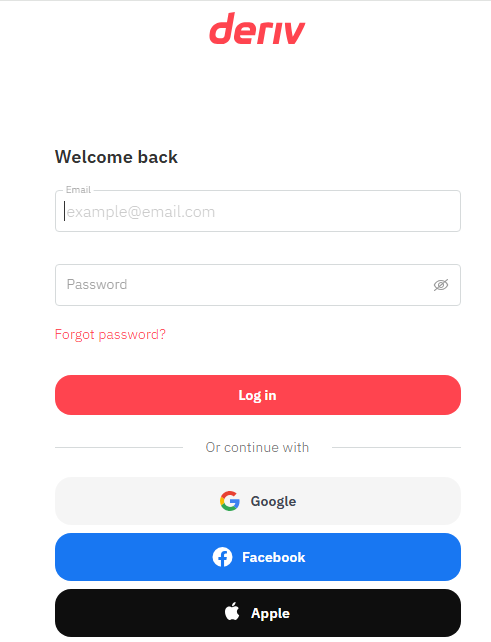
Then enter your login details and then tap on the login button, and you will be logged in successfully to your Deriv account.
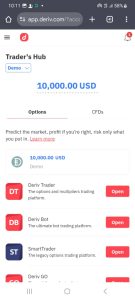
Step 2: Create Synthetic indices trading account
To be able to add Boom and Crash on MT5 and trade it, you need to create a synthetic indices trading account inside your Deriv account and connect the account to MT5.
To begin, switch from option to CFD and then click on the button beside “standard account” as shown below;
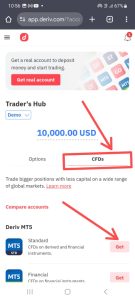
You will be prompted to choose a password. Endeavor to note the password because you need it to connect your account to MT5.
Step 3: Connect Your Boom and crash account to MT5
After creating a DMT5 password, you will see an open button like the one shown in the image below; click on it.
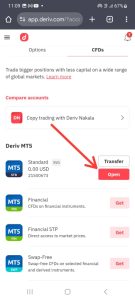
Then, you will be presented with DMT5 login details.
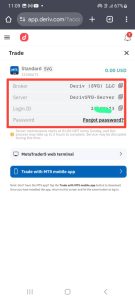
Then note down the details (broker, server, login ID, and password) because it is what you will use to connect your account to MT5.
You can watch the video below to learn how to connect your Deriv account to MT5.
After noting the DMT5 login details, Open your MT5 app and click on the plus button as shown on the image below;
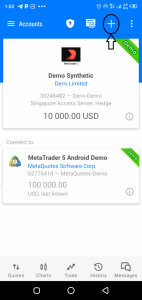
Then search for “Deriv” and select “Deriv SVG” as the server in the search result;
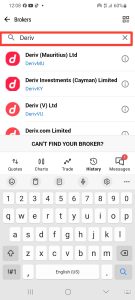
Then enter your login details as you noted them previously
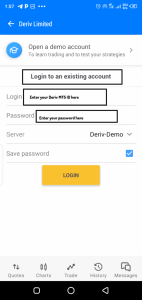
Then click on the login button, and you will be logged in to your DMT5 account automatically.
Step 4: Add boom and crash to MT5 Quotes tab
After logging in to your account, You can then go to the quotes tab and tap on the “plus” button shown below to begin adding boom and crash to MT5 quote tab.
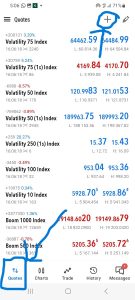
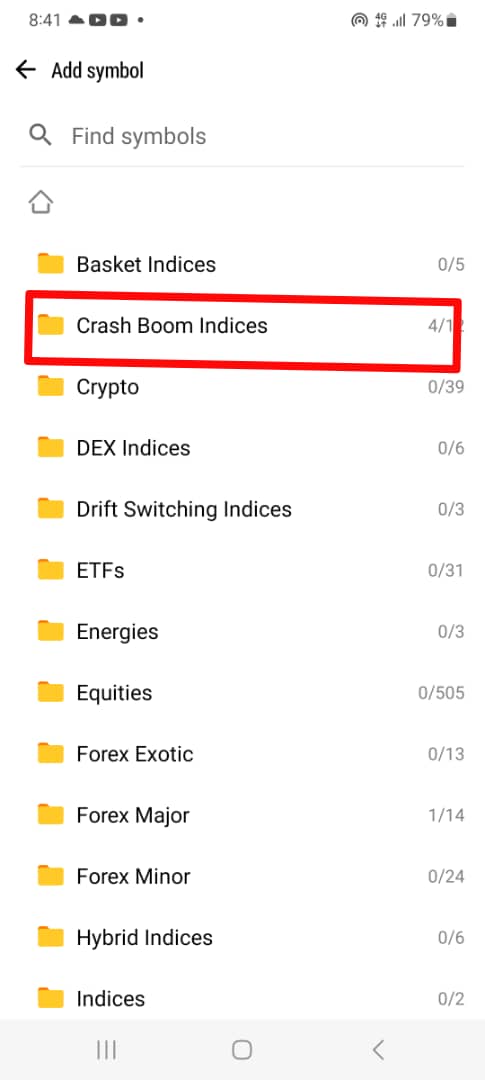
Then search and select “Crash Boom indices” as shown below;
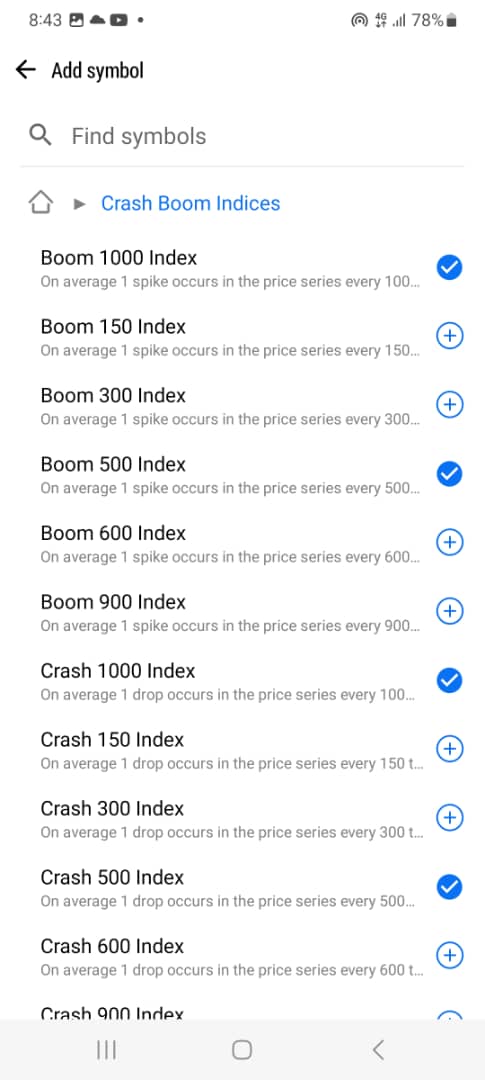
Then tick the specific boom and crash instrument that you want to trade so that they will be added to the quotes tab.
That’s all on how to add boom and crash to MT5. Here is a video tutorial on how to do it in case you prefer video guide.
Frequently Asked Questions About Boom and Crash on MT5
How do I add Boom and Crash to MT5?
To add Boom and Crash to MT5, you first need a Deriv Synthetic Indices account that is connected to MT5. After logging into your Deriv MT5 account, open the Quotes tab, tap the + button, search for Crash Boom Indices, and select the Boom or Crash instrument you want to add.
If you don’t have a Deriv Synthetic Indices account yet, you can sign up with Deriv and then follow the account setup steps in this guide.
How do I add Boom 1000 to MT5?
To add Boom 1000 to MT5:
- Log in to your Deriv MT5 account.
- Open the Quotes tab.
- Tap the + button.
- Search for Crash Boom Indices.
- Find Boom 1000 Index in the list.
- Tap the instrument to add it to your Quotes tab.
After adding Boom 1000, you can tap the instrument to open its chart and begin analyzing the market.
How do I add Boom 500 to MT5?
To add Boom 500 to MT5, log in to your Deriv MT5 account and open the Quotes tab. Tap the + button and search for Crash Boom Indices. You should then see the available Boom instruments, including Boom 500. Select Boom 500 to add it to your Quotes tab.
How do I add Crash 500 to MT5?
To add Crash 500 to MT5:
- Open your Deriv MT5 account.
- Go to the Quotes tab.
- Tap the + button.
- Search for Crash Boom Indices.
- Select Crash 500 Index.
Crash 500 will then appear in your Quotes tab, where you can open its chart and monitor the instrument.
How do I add Crash 1000 to MT5?
To add Crash 1000 to MT5, open the Quotes tab in your Deriv MT5 app and tap the + button. Search for Crash Boom Indices, locate Crash 1000 Index, and tap it to add it to your Quotes tab.
Once added, you can open the Crash 1000 chart directly from your MT5 platform.
How do I add Boom 300 to MT5?
Once you have signed up with Deriv and connected your synthetic indices trading account to MT5, open MT5 and go to Quotes → + → Crash Boom Indices. Search through the available Boom instruments and select Boom 300 to add it to your Quotes tab.
How do I add Crash 300 to MT5?
To add Crash 300, open your Deriv MT5 account and go to Quotes. Tap the + button, search for Crash Boom Indices, and select Crash 300 if it is available on your account.
How do I add Boom 1000, Boom 500, Crash 500 and Crash 1000 to MT5?
You can add all four instruments from the same Crash Boom Indices section in MT5.
After logging into your Deriv MT5 account:
- Go to Quotes.
- Tap +.
- Search for Crash Boom Indices.
- Select Boom 1000.
- Select Boom 500.
- Select Crash 500.
- Select Crash 1000.
The selected instruments will then appear in your MT5 Quotes tab.
Why can’t I find Boom and Crash on my MT5?
If you cannot find Boom and Crash on MT5, there are several possible reasons. You may be logged into a regular forex/CFD account instead of a Deriv Synthetic Indices account, or you may not have connected the correct Deriv MT5 server.
First, check that you are logged into the correct Deriv MT5 account. Then open the Quotes tab, tap +, and search for Crash Boom Indices.
If the instruments still do not appear, check your Deriv account and make sure your Synthetic Indices account is properly connected to MT5.
Why is Boom 1000 not showing on my MT5?
If Boom 1000 is not showing, make sure you are logged into the correct Deriv MT5 account and that you are searching under Crash Boom Indices rather than searching only for “Boom 1000.”
If it is still unavailable, verify that the instrument is currently offered on your account.
Why is Crash 1000 not showing on my MT5?
Crash 1000 may not appear if you are connected to the wrong MT5 account or searching in the wrong instrument category.
Go to Quotes → + → Crash Boom Indices and check the available Crash instruments. If Crash 1000 is not listed, confirm that you are using the correct Deriv Synthetic Indices account.
Do I need a Deriv account to trade Boom and Crash on MT5?
Yes. Boom and Crash are proprietary Synthetic Indices offered by Deriv. To trade them through MT5, you need a compatible Deriv Synthetic Indices trading account and the correct MT5 login credentials.
If you don’t have an account yet, you can create a Deriv account here.
Can I trade Boom and Crash on MT5 without a Deriv account?
No. You need a compatible Deriv account to access Deriv’s Boom and Crash instruments through MT5.
Simply downloading the MT5 app does not automatically give you access to Boom and Crash. You must first have the appropriate Deriv account and connect it to MT5.
Can I add Boom and Crash to MT5 on my phone?
Yes. You can add Boom and Crash through the MT5 mobile app after connecting your Deriv Synthetic Indices account.
Open MT5, go to Quotes, tap the + button, search for Crash Boom Indices, and select the instruments you want to monitor.
Can I add Boom and Crash to MT5 on a PC?
Yes. Boom and Crash can also be accessed through MT5 on a computer when you are logged into the appropriate Deriv MT5 account.
The exact interface may look different from the mobile app, but the basic process is the same: log in to the correct Deriv MT5 account and add the available Boom and Crash instruments from the Market Watch/Quotes section.
What Boom and Crash indices can I add to MT5?
The Boom and Crash instruments available to you depend on the instruments currently offered by Deriv and the account you are using. Examples include instruments such as Boom 500, Boom 1000, Crash 500, and Crash 1000.
To see the instruments currently available on your account, log in to MT5 and check the Crash Boom Indices category.
What is the difference between Boom 500 and Boom 1000?
Boom 500 and Boom 1000 are different Synthetic Indices offered by Deriv. The number in the name refers to the index’s stated average frequency of spikes under its defined model.
They are separate trading instruments, so you need to select the specific Boom index you want to trade from the available instruments in MT5.
What is the difference between Crash 500 and Crash 1000?
Crash 500 and Crash 1000 are different Synthetic Indices. Like the Boom indices, the number indicates the stated average frequency of the relevant market event under the index’s model.
You can add them separately to MT5 from the Crash Boom Indices category.
Why can I see Boom and Crash on someone else’s MT5 but not mine?
The most common reason is that you are not logged into the same type of account. Boom and Crash are not automatically available on every MT5 account.
Check that you are using a Deriv Synthetic Indices account, that you have entered the correct MT5 login credentials, and that you are connected to the correct Deriv server.
How do I connect my Deriv Synthetic Indices account to MT5?
After creating your Deriv Synthetic Indices account, Deriv provides the MT5 login information you need, including your login ID, server and password.
Open MT5, choose the option to log in to an existing account, search for the appropriate Deriv server, and enter your credentials.
For a detailed walkthrough, see our guide on how to open and connect a Deriv Synthetic Indices account to MT5.
Do I need to download a separate Boom and Crash MT5 app?
No. You do not need a special MT5 application specifically for Boom and Crash.
You can use the regular MetaTrader 5 (MT5) application and log in with your compatible Deriv MT5 account. After logging in, add the available Boom and Crash instruments from the Quotes/Market Watch section.
Is Boom and Crash trading available on a demo account?
Deriv provides demo trading options for its products, and all the boom and crash index instruments are available on the demo account as well.
Are Boom and Crash forex pairs?
No. Boom and Crash are Synthetic Indices, not traditional forex currency pairs such as EUR/USD or GBP/USD.
They are designed to simulate certain market behaviors and are available through Deriv rather than being based on the price movements of traditional currency pairs.
Can I add Boom and Crash to MT5 without connecting a Deriv account?
No. The MT5 application itself does not provide Boom and Crash instruments. You need to log in through a compatible Deriv MT5 account before the instruments become available.
If you are yet to create one, sign up with Deriv and then follow the steps in this guide to connect your account to MT5.
What should I do if Boom and Crash disappear from my MT5 Quotes tab?
First, check whether you are still logged into the correct Deriv MT5 account. If you have accidentally switched accounts or servers, the available instruments may change.
You can also return to Quotes → + → Crash Boom Indices and add the instruments again.
If the problem continues, check your Deriv account and MT5 connection details.
Can I add multiple Boom and Crash indices to MT5 at the same time?
Yes. You can add multiple instruments to your MT5 Quotes tab. For example, you can add Boom 500, Boom 1000, Crash 500, and Crash 1000 and monitor them from the same MT5 account.
Simply search for Crash Boom Indices and select each instrument you want to add.
How do I remove Boom and Crash from my MT5 Quotes tab?
To remove an instrument from your MT5 Quotes tab, open the Quotes section, select the edit/manage option, choose the Boom or Crash instrument you want to remove, and delete it from the list.
You can always add it again later by searching for the instrument under Crash Boom Indices.
Can I trade Boom and Crash from my MT5 phone app?
Yes. Once your Deriv MT5 account is connected, you can use the MT5 mobile application to view charts, analyze available instruments, and place trades according to your account’s permissions.
Make sure you understand how the instrument works and the risks involved before trading with real money.
What is the easiest way to add Boom 500 and Crash 500 to MT5?
The quickest method is:
MT5 → Quotes → + → Crash Boom Indices → Boom 500 / Crash 500
Select the instruments you want, and they will be added to your Quotes tab.
What is the easiest way to add Boom 1000 and Crash 1000 to MT5?
The process is also straightforward:
MT5 → Quotes → + → Crash Boom Indices → Boom 1000 / Crash 1000
Select each instrument you want to trade, and it will appear in your Quotes tab.
Where can I open a Boom and Crash trading account?
You can create a Deriv account and then open the appropriate Synthetic Indices account from your Deriv dashboard.
If you are new to Deriv, start by creating a Deriv account, then follow our step-by-step guide on opening a Boom and Crash account and connecting it to MT5.
Can I use the same MT5 account to trade different Boom and Crash indices?
Yes. If the instruments are available on your Deriv Synthetic Indices account, you can add multiple Boom and Crash instruments to the same MT5 Quotes tab and access them from your account.
For example, you can have Boom 500, Boom 1000, Crash 500, and Crash 1000 displayed together.
Is it free to add Boom and Crash to MT5?
Adding the instruments to your MT5 Quotes tab does not require a separate fee. However, trading involves costs and risks, and you should check the current trading conditions for the specific instrument and account you are using.
What do I need before adding Boom and Crash to MT5?
Before you begin, make sure you have:
- A Deriv account
- A Standard Synthetic Indices trading account
- Your Deriv MT5 login ID
- Your MT5 password
- The correct Deriv MT5 server
- The MT5 application installed on your phone or computer
Once these are ready, you can connect your account and add the Boom and Crash instruments to MT5.
Can I add Boom and Crash to MT5 without knowing my MT5 password?
No. You need the correct MT5 login credentials to connect your Deriv Synthetic Indices account to MT5.
When you create the MT5 account through Deriv, make sure you save the login ID, server and password somewhere secure.
What should I do after adding Boom and Crash to MT5?
After adding the instruments, you can open the chart for the specific index you want to analyze. Before placing a live trade, make sure you understand the instrument’s trading conditions, contract specifications, spread, leverage and risk.
If you are new to Boom and Crash, consider practicing on a demo account first.

Hello, I’m Alexander, the writer and founder behind Synthetic Giant.
I am a seasoned forex and synthetic indices trader with years of hands-on experience in the financial markets, including cryptocurrency, forex, and stocks. Over time, I’ve gained a strong understanding of how different markets work, and I’ve developed a passion for helping others navigate them.
In addition to trading, I have a strong background in writing and research. This combination inspired me to create Synthetic Giant — a platform dedicated to providing traders with tips, strategies, broker reviews, and step-by-step guides on synthetic indices.
My goal is simple: to help beginners and experienced traders alike gain the knowledge they need to trade synthetic indices confidently and profitably.
When I’m not trading or writing, I’m often exploring new ways to simplify financial concepts and share them with my audience in clear, practical terms.
For inquiries, feel free to reach me at admin@syntheticgiant.com
.