The synthetic indices market is becoming more popular every day. Many forex traders are switching to it because of the unique advantages it has over currency pairs. For example, synthetic indices can be traded 24/7, and they do not require knowledge of fundamental analysis. This is because synthetic indices are simulated markets driven by mathematical algorithms, not influenced by real-world economic events. As a result, they are immune to fundamental factors like news releases, interest rates, and political instability.
Have you seen people trading synthetic indices on MT5 and want to do the same?
You’re in the right place. In this blog post, I will show you how to add synthetic indices on MT5.
Unlike currency pairs, synthetic indices are proprietary instruments created and managed by brokers. This means a synthetic index available on one broker may not exist on another.
Currently, Deriv and Weltrade are two of the most popular brokers offering synthetic indices.
Synthetic Indices Offered by Deriv
Deriv provides a wide range of synthetic products, including:
-
Volatility Indices: VIX 10, 25, 50, 75, 100
-
Jump Indices: Jump 10, 25, 50, 75, 100
-
Crash & Boom Indices: Boom 300, Boom 500, Boom 1000, Crash 300, Crash 500, Crash 1000
-
Step Index
-
Range Break Indices: Range Break 100, Range Break 200
-
Scale Indices: Volatility 150 (1s), Volatility 250 (1s), others
-
Daily Reset Indices
Synthetic Indices Offered by Weltrade
Weltrade also offers its own synthetic instruments, including:
-
FX Vol
-
SFX Vol
-
PainX
-
GainX
-
FlipX
-
SwitchX
In this post, I’ll guide you step-by-step on how to add Deriv synthetic indices to MT5.
Let’s get started.
How to Add Synthetic Indices on MT5
In case you prefer to watch a video on How to Add Synthetic Indices on MT5, check out the video below.
Here are steps to add synthetic indices on MT5:
Step 1: Sign up with a synthetic indices broker
As stated earlier, synthetic indices are proprietary instruments, which means you won’t find them on most forex brokers, unlike regular currency pairs. As of today, the two most popular brokers that offer synthetic indices are Deriv and Weltrade, and each provides different synthetic index instruments.
Because Deriv’s synthetic indices are more popular and widely traded, this post will focus on showing you how to sign up with Deriv and start trading their synthetic indices.
To begin, visit the Deriv sign-up page, and you’ll be taken to a page like this:
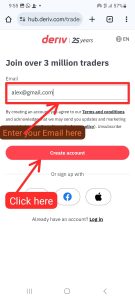
Then enter your email address and complete the email verification to sign up with them. After signing up, you will be brought to a page that looks like this:
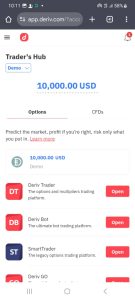
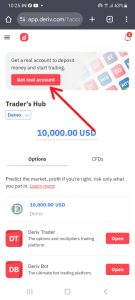
Then you can go ahead and verify your account by clicking on the “get a real account” button below.
Step 2: Create Synthetic Indices trading Account
After signing up with Deriv successfully, the next thing to do is to create a synthetic indices trading account inside your Deriv account.
To begin, switch from the “Option tab” to the “CFD tab” and then click on the get button as shown on the image below.
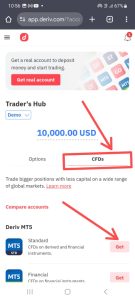
Once you click on the “get button,” you will be prompted to create a DMT5 password. Endeavor to note the password because it is what you will use to connect your account to MT5.
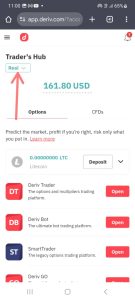
Note: If you want to create a real synthetic indices trading account, remember to switch from demo to real as shown in the image below.
Step 3: Connect Your trading account to MT5
After creating a DMT5 account as shown in step 2 above, the next step is to connect the account to MT5. To begin, tap on the open button as shown in the image below.
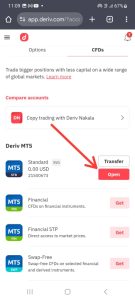
Then, the DMT5 login details will be opened. These details include the broker, server, login ID, and the DMT5 password. Note down each of those details because you will need it to connect your account to MT5.
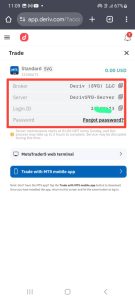
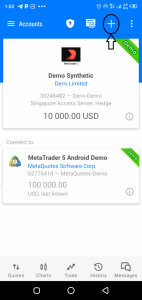
After noting the MT5 login details, download and open your MT5 app. Then click on the plus button as shown in the image below.
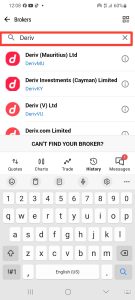
Then search for “Deriv” and select “Deriv SVG” as the server in the search result;
Then enter your login details. The login details required are the ones you noted down after clicking on the open button above. Enter it according to the instruction on the image below and then click on the login button.
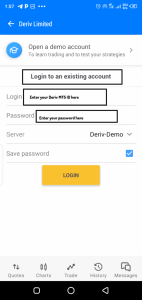
If you entered the details properly, you will be logged in successfully.
Step 4: Add synthetic indices to MT5 Quotes tab
Once you connect your synthetic indices trading account to MT5 successfully, the next thing is to add synthetic indices to the quotes tab and start trading. Depending on the instrument you prefer trading, you add boom and crash, volatility indices, or step indices.
To begin, tap on the plus button as shown on the image below;
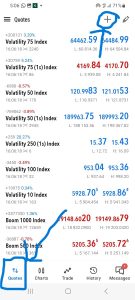
Then search for the synthetic indices you want to trade and add it to the quotes tab by checking the button beside it.
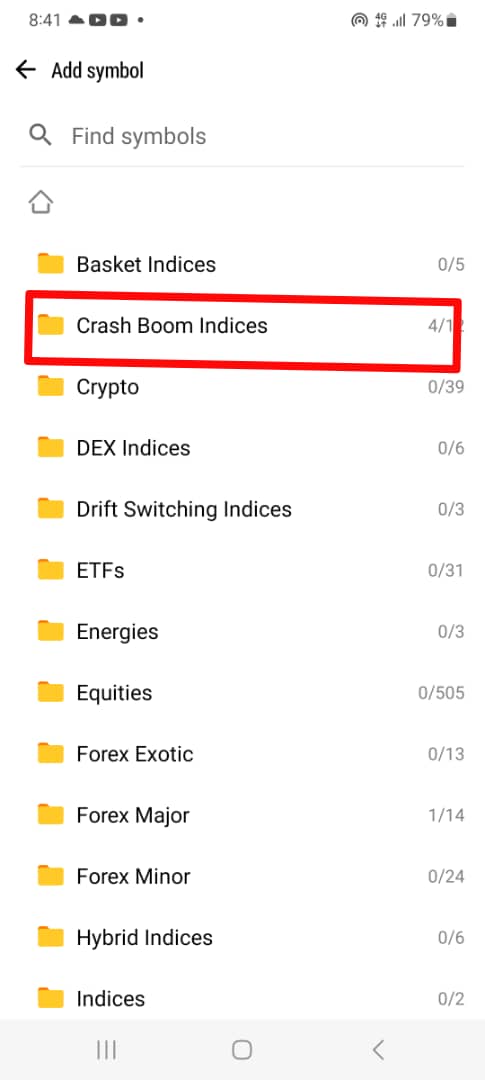
For example, If i want to add boom and crash indices to the quotes tab, i will search and select “Crash Boom indices” as shown below:
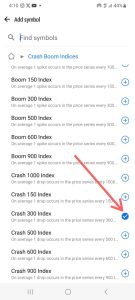
Then tick the check button beside any boom and crash indices you want to trade and they will be added to the quotes tab.
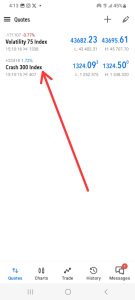
Once you go back to the quotes tab, you will find Crash 300, and you can then start analyzing and trading it just like the way you trade other instruments on MT5.
Can I trade synthetic indices on MT5?
How to Start Trading Synthetic Indices
To start trading synthetic indices, you need to sign up with Deriv or Weltrade, which are the two major brokers that offer synthetic indices. After signing up, create a Synthetic Indices trading account with them, and then connect the account to MT5 to begin trading.
Can I trade synthetic indices with $10?
Yes, you can. Deriv, one of the brokers that offers synthetic indices, allows a minimum deposit of just $5. With as little as $5 or $10, you can start trading synthetic indices either as CFDs or binary options on Deriv’s trading platforms.

Hello, I’m Alexander, the writer and founder behind Synthetic Giant.
I am a seasoned forex and synthetic indices trader with years of hands-on experience in the financial markets, including cryptocurrency, forex, and stocks. Over time, I’ve gained a strong understanding of how different markets work, and I’ve developed a passion for helping others navigate them.
In addition to trading, I have a strong background in writing and research. This combination inspired me to create Synthetic Giant — a platform dedicated to providing traders with tips, strategies, broker reviews, and step-by-step guides on synthetic indices.
My goal is simple: to help beginners and experienced traders alike gain the knowledge they need to trade synthetic indices confidently and profitably.
When I’m not trading or writing, I’m often exploring new ways to simplify financial concepts and share them with my audience in clear, practical terms.
For inquiries, feel free to reach me at admin@syntheticgiant.com
.