I created a Deriv Affiliate Login Guide to show you practically how to access your affiliate dashboard step by step.
If you’ve successfully joined the Deriv Affiliate Program, congratulations! Now the next step is learning how to log in to your affiliate account and use the dashboard effectively.
Your affiliate dashboard is where you’ll manage your referral links, monitor sign-ups, track commissions, and access promotional resources that can help you grow your affiliate business.
Whether you’re logging in for the first time or returning after a break, this guide explains everything you need to know in a simple, step-by-step format.
Why the Deriv Affiliate Login Matters
Many beginners think the affiliate dashboard is only for checking commissions. In reality, it is the control center of your affiliate business.
After logging in, you can:
- Access your unique affiliate referral links.
- Track new client registrations.
- Monitor your commission earnings.
- View reports and performance statistics.
- Download banners and promotional materials.
- Manage your affiliate account settings.
If you plan to earn consistent commissions, you’ll need to log in regularly to monitor your progress and improve your marketing strategy.
Who Can Log In to the Deriv Affiliate Dashboard?
The affiliate login is only available to users who have successfully registered for the Deriv Affiliate Program.
If you haven’t created an affiliate account yet, you’ll need to complete your registration before you can access the dashboard.
Many beginners mistakenly try to log in using their regular Deriv trading account. While both accounts may use the same email address, affiliate services are only available after you’ve joined the affiliate program.
If you’re still planning to register, consider using the affiliate registration link provided on this website. Once your application is approved, you’ll receive access to the affiliate dashboard, where you can start promoting Deriv and earning commissions according to the program’s terms.
Don’t create your affiliate account through a random link. Join through our recommended affiliate link and get practical guides, proven strategies, and ongoing support that can help you earn more from day one.
What You Need Before Logging In
Before opening the login page, make sure you have the following information ready:
1. Your Registered Email Address
Use the same email address you entered when creating your affiliate account.
Entering a different email address is one of the most common reasons affiliates cannot access their dashboard.
2. Your Password
You’ll also need the password you created during registration.
Remember that passwords are case-sensitive, so check that your keyboard settings are correct before logging in.
3. A Reliable Internet Connection
A stable internet connection helps prevent interrupted login attempts and loading errors.
4. A Secure Device
Whenever possible, log in using your personal laptop, desktop, tablet, or smartphone.
Avoid accessing your affiliate account from public computers or shared devices, especially if they are used by multiple people.
Step-by-Step Guide to Log In to Your Deriv Affiliate Account
Follow these steps carefully; it will show you practically how to log in to your Deriv affiliate account successfully.
Step 1: Visit the Official Deriv Affiliate Login Page
Open your preferred web browser and go to the official Deriv Affiliate login page.
Always confirm that you’re using the official login page before entering your email address and password. This simple habit helps protect your account from fake websites designed to steal login details.
If you’re reading this guide from our website, you can simply click the affiliate login button provided here to reach the correct page.
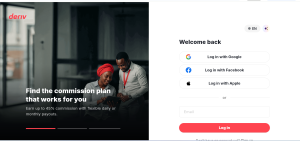
Step 2: Enter Your Registered Email Address
Locate the email field and type the email address you used during affiliate registration.
Before moving to the next step, check for spelling mistakes.
Something as small as an extra space or a missing letter can prevent you from accessing your account.
Step 3: Enter Your Password
Next, enter your password carefully.
If you’re using your own computer, you may choose to save your login details for quicker access in the future.
However, never save your password on a public computer or a device that other people can access.
Step 4: Click the Login Button
After confirming your login details are correct, click the Login button.
If your email address and password match your account records, you’ll be redirected to your affiliate dashboard within a few seconds.
What to Do Immediately After Logging In
Many new affiliates log in, copy their referral link, and leave.
While this isn’t wrong, you’ll get much better results by spending a few minutes exploring your dashboard.
You can watch the video below to learn more about your Deriv affiliate dashboard.
Here’s what you should do first.
(1) Check Your Dashboard Overview
The dashboard provides a quick summary of your affiliate account.
Depending on your account, you may see information such as:
- Recent registrations
- Active referrals
- Commission updates
- Performance reports
- Important notifications
Reviewing this information regularly helps you understand how your promotional efforts are performing.
(2) Locate Your Referral Link
Your referral link is one of the most important tools inside your affiliate dashboard.
Every eligible person who registers through your unique referral link is associated with your affiliate account according to the program’s tracking rules.
Instead of sharing the same generic homepage link everywhere, always use your unique affiliate link. This ensures that qualifying referrals are correctly attributed to your account.
If you’re following the tutorials and strategies shared on this website, you’ll also discover practical ways to promote your referral link more effectively without relying on spam or random posting.
(3) Check out the Marketing Resources
Deriv’s affiliate dashboards include promotional materials designed to help affiliates market the platform more professionally.
Take a few minutes to explore available resources such as banners, campaign materials, and other promotional assets.
Using professionally designed marketing materials can improve the appearance of your content and make your promotions more trustworthy.
Understanding the Different Sections of Your Affiliate Dashboard
Once you’ve successfully logged in, it’s worth taking a few minutes to understand how the dashboard is organized. Knowing where everything is will save you time and help you manage your affiliate business more efficiently.
Although the dashboard layout may change from time to time as new features are introduced, the core sections remain largely the same.
1. Dashboard Overview
This is the first page you’ll usually see after logging in.
The dashboard provides a summary of your affiliate activity, allowing you to monitor your performance without opening multiple pages.
Depending on your account and commission model, you may see:
- Total referrals
- Active clients
- Recent registrations
- Estimated earnings
- Commission history
- Performance trends
Checking this page regularly gives you a clear picture of how your marketing efforts are performing.
2. Referral Management
This section helps you monitor the people who signed up through your affiliate link.
Instead of wondering whether your promotional efforts are producing results, you can review your referral activity directly from your dashboard.
Many experienced affiliates check this section daily to measure the effectiveness of their content, social media posts, YouTube videos, blog articles, or paid advertising campaigns.
If you notice an increase in referrals after publishing a helpful guide or tutorial, you’ll know that your strategy is working and can continue creating similar content.
3. Commission Reports
One of the most important sections of the dashboard is your commission report.
Here, you can review your earnings and monitor how your referrals contribute to your affiliate income.
Regularly checking your commission reports allows you to:
- Track your earnings.
- Monitor commission growth.
- Compare different promotional campaigns.
- Identify which traffic sources perform best.
Rather than promoting your affiliate link everywhere, these reports help you focus on the methods that generate better results.
4. Marketing Tools
Successful affiliates don’t create every promotional material from scratch.
Inside your dashboard, you’ll usually find marketing resources that can help you promote Deriv more professionally.
These resources may include banners, promotional graphics, campaign materials, and other marketing assets that are designed to attract potential clients.
Using these resources can make your promotions look more credible while saving you time.
How to Find Your Affiliate Referral Link
Your referral link is what connects new registrations to your affiliate account.
Without sharing your unique affiliate link, eligible referrals cannot be attributed to you.
Finding your link is straightforward.
Step 1: Log In to Your Dashboard
Access your affiliate dashboard using your registered email address and password.
Step 2: Navigate to the Referral or Marketing Section
After logging in, open the section that contains your promotional tools or referral links.
This is where your unique tracking link is stored.
Step 3: Copy Your Referral Link
Click the copy button or manually copy the complete URL.
Before sharing it, double-check that the entire link has been copied correctly.
A broken or incomplete link may prevent proper referral tracking.
Step 4: Share Your Link Strategically
Instead of posting your affiliate link everywhere without context, place it where people are already looking for information.
For example, you can include it in:
- Educational blog posts
- Step-by-step tutorials
- YouTube video descriptions
- Trading guides
- Email newsletters
- Resource pages
People are generally more willing to register after you’ve answered their questions and shown them how the platform works.
If you haven’t received your own referral link yet, this is your sign to start. Register through this our affiliate link and get instant access to your affiliate dashboard once approved.
How to Check Your Affiliate Commissions
One advantage of logging in regularly is being able to monitor your earnings.
To view your commissions:
Step 1: Sign in to your affiliate dashboard.
Step 2: Open the wallet page.
Step 3: Review your available reports.
Depending on your affiliate program, you may be able to see commission summaries, payment history, and other performance data.
Checking these reports frequently helps you understand whether your marketing efforts are improving over time.
How to Monitor Your Referral Performance
Successful affiliates don’t rely on guesswork.
They use performance data to improve their promotional strategy.
As you review your reports, ask yourself questions like:
- Which article generated the most registrations?
- Which traffic source brought the highest-quality referrals?
- Which promotional method deserves more attention?
Answering these questions allows you to spend more time on strategies that produce better results instead of repeating methods that generate little or no activity.
Developing this habit can make a significant difference as your affiliate business grows.
Can You Log In Using a Mobile Phone?
Yes.
You can access your Deriv Affiliate account using a smartphone or tablet, provided you have a compatible web browser and a stable internet connection.
The login process is almost identical to using a desktop computer.
Simply open the official affiliate login page, enter your registered email address and password, then sign in to your dashboard.
For affiliates who frequently work while traveling, mobile access makes it easy to monitor registrations, review commissions, and copy referral links whenever needed.
What to Do If You Forget Your Password
Forgetting your password doesn’t mean you’ve lost access to your affiliate account. You can reset it within a few minutes by following the password recovery process.
Step 1: Open the Affiliate Login Page
Go to the official Deriv Affiliate login page.
Step 2: Click “Forgot Password”
Below the login form, you’ll find the Forgot Password option. Click it to begin the password reset process.
Step 3: Enter Your Registered Email Address
Provide the email address you used when registering for your affiliate account.
Double-check the spelling before submitting the request.
Step 4: Check Your Email Inbox
Deriv will send password reset instructions to your registered email address.
If you don’t see the email after a few minutes, check your Spam or Junk folder before requesting another reset link.
Step 5: Create a New Password
Follow the instructions in the email and choose a strong password that is difficult for others to guess.
Once you’ve created your new password, return to the login page and sign in to your affiliate dashboard.
Common Deriv Affiliate Login Problems and How to Fix Them
Most login problems are easy to resolve. Before contacting support, check whether one of these common issues is preventing you from accessing your account.
1. Incorrect Email Address
Always use the email address you registered with.
A single typing mistake can stop you from logging in successfully.
2. Incorrect Password
Passwords are case-sensitive.
If your password isn’t working, make sure Caps Lock isn’t turned on and try entering it again carefully.
If you’ve forgotten it, use the password recovery option.
3. Slow or Unstable Internet Connection
Poor internet connectivity can interrupt the login process.
Refresh the page or switch to a more stable internet connection before trying again.
4. Browser Issues
Sometimes your browser stores outdated files that interfere with website performance.
Clear your browser cache and cookies or try using another browser to see if the problem is resolved.
4. Temporary Website Maintenance
Occasionally, the affiliate portal may be temporarily unavailable due to scheduled maintenance or system updates.
If this happens, wait a while and try logging in again later.
Tips to Keep Your Affiliate Account Safe
Protecting your affiliate account is just as important as growing it.
Use these simple security practices to reduce the risk of unauthorized access.
- Create a strong and unique password.
- Never share your login credentials with anyone.
- Avoid logging in through public Wi-Fi unless you’re using a secure connection.
- Sign out after using a shared device.
- Change your password periodically.
- Only log in through the official Deriv Affiliate website.
These simple habits can help protect both your account information and your commission earnings.
Best Practices After Logging In
Logging in should become part of your regular affiliate routine.
Instead of checking your dashboard only when you’re expecting commissions, make it a habit to review your account consistently.
After logging in, consider doing the following:
- Review your latest referral activity.
- Check your commission reports.
- Copy your referral link when creating new content.
- Download updated promotional materials if available.
- Monitor which marketing efforts are producing the best results.
Small improvements made consistently can have a positive impact on your long-term affiliate performance.
You’re now ready to access the same affiliate dashboard successful Deriv partners use every day. Click this registration link to create your affiliate account, and start building an income stream that can grow over time.
Frequently Asked Questions
Is the Deriv Affiliate login different from the Deriv trading account login?
Yes. While the accounts may be connected, the affiliate dashboard is specifically designed for managing affiliate activities, referrals, commissions, and promotional tools.
Can I log in on more than one device?
Yes. You can access your affiliate account from different devices, provided you use your correct login credentials.
Can I change my login email?
If you need to update your account information, check your account settings or contact Deriv support for guidance.
Why can’t I see my referral link?
Make sure you’ve successfully joined the affiliate program and logged into the correct affiliate dashboard. If the issue continues, contact support for assistance.
How often should I log in?
Many successful affiliates check their dashboard several times each week to monitor referrals, commissions, and overall account performance.
Is my referral link always the same?
Your unique affiliate link is generally assigned to your account. However, always copy it directly from your dashboard to ensure you’re sharing the correct link.
Conclusion
Learning how to log in to your Deriv Affiliate account is one of the first steps toward building a successful affiliate business. Once you’re inside your dashboard, you’ll have access to the tools needed to monitor referrals, track commissions, manage promotional resources, and evaluate your marketing performance.
More importantly, don’t treat your affiliate dashboard as a place to check earnings alone. Use it to understand what’s working, improve your promotional strategy, and identify new opportunities to grow your audience.
You’ve now seen exactly how the Deriv Affiliate login works and what you can do inside the dashboard. The only thing left is to create your own affiliate account and start using these tools yourself.
The more consistently you monitor your dashboard and create helpful content for your audience, the better your chances of building a steady stream of affiliate commissions over time.