Tired of Waiting for the Forex Market to Open?
Imagine this: you work a regular 9-to-5 job, and by the time you get home, the forex market is already moving toward the end of its trading day. You’ve spent the whole day waiting for an opportunity to trade, only to realize that the weekend is approaching and the market will soon be closed.
This is one of the challenges many forex traders face. Your availability doesn’t always match the market’s trading hours.
Now imagine having access to a market that doesn’t require you to wait for Monday morning before you can start trading again.
That is one of the reasons synthetic indices have attracted the attention of many traders.
Unlike traditional forex pairs, synthetic indices are available around the clock, giving traders the flexibility to look for trading opportunities at different times of the day, including weekends. This can be particularly useful for people who have full-time jobs or other commitments during regular market hours.
Another interesting characteristic of synthetic indices is that their price movements are not driven by traditional economic news events in the same way as forex markets. This means traders can focus more on technical analysis, market structure, and trading psychology rather than constantly worrying about economic announcements affecting their trades.
With more brokers now offering synthetic indices, getting access to these instruments has also become easier.
One of the brokers that currently offers synthetic indices is Weltrade.
In this guide, I’ll show you exactly how to create a Weltrade synthetic indices account and connect it to MT5 so you can access and trade the synthetic indices available on the platform.
The process is relatively straightforward, and you can follow these steps whether you want to create a demo account for practice or a real account for live trading.
In case you prefer a video guide, here is a video on how to create a Weltrade synthetic indices account and connect it to MT5:
What You Need to Create a Weltrade Synthetic Indices Account
Before you begin, you’ll need:
- A Weltrade account
- The email address you used to register with Weltrade
- The MT5 application
- Your Weltrade synthetic indices account MT 5 login details
- An internet connection
How to Create a Weltrade Synthetic Indices Account on MT5
If you don’t have a Weltrade account yet, you’ll need to sign up first.
Step 1: Sign Up for a Weltrade account.
To trade synthetic indices with Weltrade, the first step is to create a Weltrade account if you don’t already have one.
Visit the Weltrade registration page and you will be taken to a page that looks like this:
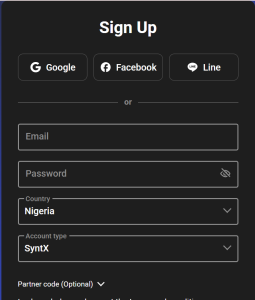
Then fill in the form and complete the email verification.
After successfully registering, log in to your Weltrade account.
Once you log in, you’ll be taken to your Weltrade dashboard.
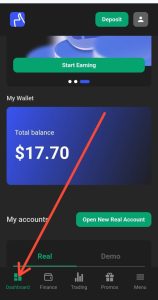
Step 2: Go to Your Weltrade Dashboard
After logging into your account, make sure you are on the dashboard.
Weltrade provides different sections within your account, including:
- Dashboard
- Finances
- Trading
- Promos
To create a synthetic indices trading account, you need to use the dashboard.
Depending on whether you want to trade with real money or practice with virtual funds, you can create either a real or demo synthetic indices account.
Step 3: Choose Between a Demo and Real Account
On the dashboard, locate the My Account section.
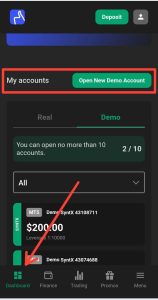
Here, you’ll see options for your Real and Demo accounts.
Creating a Demo Synthetic Indices Account
If you want to practice trading synthetic indices before risking real money, switch to the Demo section.
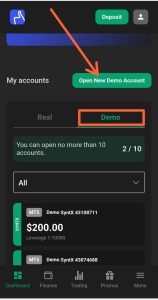
After selecting Demo, click Open New Demo Account.
Creating a Real Synthetic Indices Account
If you want to trade with real money, select the Real section.
You’ll need to click Open Real Account and complete Weltrade’s verification process. This may require you to provide an identity document and other information required for account verification.
Once your account has been verified, you can proceed with creating your real synthetic indices trading account.
For this tutorial, we’ll use a demo account.
Step 4: Open a New Synthetic Indices Trading Account
After switching to the Demo section, click Open New Demo Account.
You’ll be taken to a page where you can select the details of your new trading account.
The first option is the trading platform.
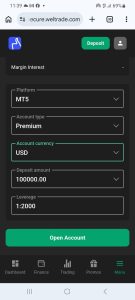
Select MT5
Weltrade provides different platform options, including:
- MT4
- MT5
Since we want to trade synthetic indices on MetaTrader 5, select MT5.
Select the Synthetic Indices Account Type
The next step is to select your account type.
To trade Weltrade synthetic indices, select the SyntX account type.
This is important because the SyntX account is the account type that houses the synthetic indices instruments offered by Weltrade.
If you select a different account type, you may not have access to the synthetic indices instruments you’re looking for.
Select Your Account Currency
Next, select your account currency.
In the example shown in the video, the available currency is USD.
Therefore, select USD as your account currency.
Select Your Account Amount
You’ll then need to choose the amount for your demo account.
Depending on the options available to you, you may be able to select different amounts, such as $100,000, $50,000, $200, and others.
If you’re using a demo account to prepare yourself for real trading, I recommend selecting an amount that is reasonably close to what you would realistically deposit into a real account.
For example, if you plan to start with $200 when you eventually trade with real money, it makes more sense to practice with a $200 demo balance rather than a $100,000 balance.
Create the synthetic indices account.
After selecting all the required account details, review your selections and click Open an Account.
Weltrade will create your synthetic indices trading account.
Your account login details will then be sent to the email address you used to register your Weltrade account.
Check your email for the MT5 login credentials.
You’ll need these details to connect your synthetic indices account to the MT5 application.
Step 5: Connect Your Weltrade Synthetic Indices Account to MT5
Once you receive your login details, open the MetaTrader 5 (MT5) application.
On the MT5 mobile app, locate the + button at the top-right corner and tap it.
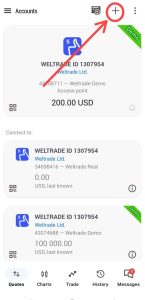
You’ll then be able to search for your broker.
Search for Weltrade
In the search field, type:
Weltrade Limited
Select the appropriate Weltrade server from the results.
You’ll then be asked to enter your account credentials.
Enter:
- Login ID
- Password
- Server
Make sure you enter the login details that Weltrade sent to your email.
The server you select depends on whether you created a demo or real account.
If you created a demo synthetic indices account, select the Weltrade demo server.
If you created a real synthetic indices account, select the appropriate Weltrade real server.
After entering all the required information, tap Login.
If the credentials are correct, MT5 will connect to your Weltrade synthetic indices account.
Step 6: Add Synthetic Indices to Your MT5 Quotes Tab
Once you have successfully connected your Weltrade synthetic indices account to MT5, the next step is to add the instruments you want to trade.
Go to the Quotes tab.
You may find that some Weltrade synthetic indices are already added to your watchlist by default.
However, if the instrument you want to trade isn’t there, you can add it manually.
To add more synthetic indices:
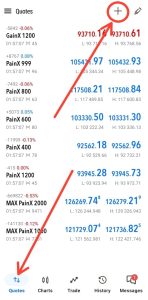
- Open the Quotes tab.
- Tap the + button.
- Select Synthetic Indices.
- Browse through the available instruments.
- Select the instruments you want to trade.
For example, if you want to trade BreakX 1200, locate it in the synthetic indices list and select it.
The instrument will then be added to your Quotes tab.
You can repeat this process to add other synthetic indices you want to trade.
Step 7: Analyze and Trade the Synthetic Indices
After adding your preferred synthetic indices to the Quotes tab, you can open an instrument and access its chart.
From the chart, you can perform your technical analysis using the tools and indicators available on MT5.
Once you have completed your analysis and identified a trading opportunity, you can proceed to place your trade.
Remember that technical analysis alone does not eliminate the risk of losing money. Synthetic indices are highly speculative instruments, so proper risk management and trading discipline are important.
How to Create a Real Weltrade Synthetic Indices Account
The process for creating a real synthetic indices account is similar to creating a demo account.
Instead of selecting Demo from the My Account section, switch to Real and select Open Real Account.
You’ll then need to:
- Complete the required account verification.
- Provide the necessary identity documents.
- Complete the verification process.
- Create your SyntX synthetic indices trading account.
- Select MT5 as your trading platform.
- Choose your account currency and other account details.
- Fund your account.
- Use the login details provided by Weltrade to connect the account to MT5.
Once connected, you can add the synthetic indices you want to trade from the Quotes tab.
Frequently Asked Questions
Can I trade synthetic indices on Weltrade MT5?
Yes. Weltrade offers synthetic indices that can be accessed through its MT5 trading platform. You need to create the appropriate synthetic indices account before connecting it to MT5.
What account type do I need to trade synthetic indices on Weltrade?
You need to select the SyntX account type when creating your Weltrade trading account.
Can I create a Weltrade synthetic indices demo account?
Yes. You can create a demo SyntX account and use it to practice trading synthetic indices on MT5 without risking real money.
How do I connect my Weltrade synthetic indices account to MT5?
Open the MT5 application, tap the + button, search for Weltrade Limited, enter your login ID and password, select the appropriate demo or real server, and tap Login.
Where can I find Weltrade synthetic indices on MT5?
After connecting your SyntX account to MT5, go to the Quotes tab. You can add additional synthetic indices by tapping the + button and selecting the synthetic indices category.
Is Weltrade synthetic indices trading available on weekends?
Synthetic indices are designed to be available outside the traditional forex market schedule, and all the synthetic index instruments offered by Weltrade are available 24/7.
Conclusion
Creating a Weltrade synthetic indices account on MT5 involves a few simple steps.
First, create or log in to your Weltrade account. Then, go to the Dashboard, select either Demo or Real, and create a SyntX account. After that, select MT5 as your trading platform and complete the account creation process.
Once Weltrade sends your MT5 login credentials, connect the account to the MT5 application and add the synthetic indices you want to trade from the Quotes tab.
If you’re new to synthetic indices, starting with a demo account can be a good way to familiarize yourself with the platform and instruments before committing real money.

Hello, I’m Alexander, the writer and founder behind Synthetic Giant.
I am a seasoned forex and synthetic indices trader with years of hands-on experience in the financial markets, including cryptocurrency, forex, and stocks. Over time, I’ve gained a strong understanding of how different markets work, and I’ve developed a passion for helping others navigate them.
In addition to trading, I have a strong background in writing and research. This combination inspired me to create Synthetic Giant — a platform dedicated to providing traders with tips, strategies, broker reviews, and step-by-step guides on synthetic indices.
My goal is simple: to help beginners and experienced traders alike gain the knowledge they need to trade synthetic indices confidently and profitably.
When I’m not trading or writing, I’m often exploring new ways to simplify financial concepts and share them with my audience in clear, practical terms.
For inquiries, feel free to reach me at admin@syntheticgiant.com
.