The synthetic indices market is gaining more popularity every day. A lot of forex traders are migrating to trading synthetic indices because of the unique advantages they have over traditional currency pairs. For instance, the synthetic indices market is available 24/7, meaning that you can trade it 24 hours a day, 7 days a week. This is especially beneficial for those working 9-to-5 jobs, as they can also trade on weekends.
Aside from that, the synthetic indices market is not affected by news events, meaning that you need mainly the knowledge of technical analysis and good trading psychology to be able to do well in this market.
If you’re looking for how to trade synthetic indices on Weltrade, you are in the right place because, in this particular post, I am going to show you how to access a range of synthetic indices instruments through a Weltrade MT5 account.
I’ll start by showing you how to create a Weltrade synthetic indices trading account, connect the account to MetaTrader 5 (MT5), find the available synthetic indices, and start trading them.
Weltrade offers several synthetic indices instruments, including Fx Volume 20, Fx Volume 80, Fx Volume 99, SFx Volume 40, SFx Volume 60, PainX 400, PainX 800, PainX 999, PainX 1200, GainX 400, GainX 800, GainX 999, and GainX 1200, among others.
The process of trading these synthetic indices offered by Weltrade is straightforward, and you can follow the steps below whether you want to use a demo account or a real trading account.
Here is a video tutorial on How to Trade synthetic indices on Weltrade;
What You Need to Trade Synthetic Indices on Weltrade
Before you can start trading synthetic indices on Weltrade MT5, you need:
- A Weltrade account
- A Weltrade synthetic indices trading account
- The MT5 application
- Your Weltrade MT5 login credentials
- A device connected to the internet
If you don’t already have a Weltrade account, you’ll need to register for one before creating your synthetic indices trading account.
How To Trade Synthetic Indices on Weltrade
Here is a step-by-step Guide on How to Trade Synthetic indices On Weltrade:
Step 1: Log in to Your Weltrade Account
If you already have a Weltrade account, the first step is to log in to your Weltrade account. However, if you don’t have a Weltrade account, you can sign up with Weltrade here. After signing up, then log in to your account and you will be brought to a page that looks like this:
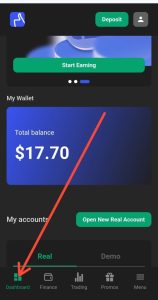
After logging in, you’ll be taken to your Weltrade account dashboard. From the dashboard, you can access different sections, including Dashboard, Finances, Trading, and Promotions.
To create a synthetic indices account, make sure you are navigated to the Dashboard.
Step 2: Create a Weltrade Synthetic Indices Trading Account
From the Weltrade dashboard, locate the My Account section.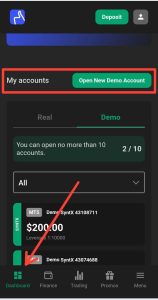
You’ll see the account type currently selected. Weltrade allows you to switch between your real and demo accounts.
If you want to practice trading synthetic indices first, select Demo. If you’re ready to trade with real money, select Real.
For this tutorial, we’ll use a demo account.
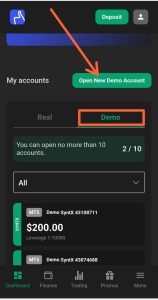
After switching to the demo section, click Open New Demo Account.
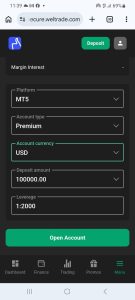
Select MT5
You’ll then be asked to select the trading platform you want to use.
Weltrade provides options such as:
- MT4
- MT5
Select MT5 if you want to trade synthetic indices through MetaTrader 5.
Select the Synthetic Indices Account Type
Next, you’ll need to select the appropriate account type. You will have Premium, Pro, SyntX, and Raw Spread as options.
Choose SyntX, which is the account type used for accessing Weltrade’s synthetic indices instruments.
Make sure you select the synthetic indices account rather than a standard forex trading account.
Select the Account Currency
Next, select your account currency.
Usually, you will have two currencies as options: USD and EUR. I will advise you to choose USD.
Choose the Account Amount
You’ll also be asked to select an account amount.
For the demonstration, I selected $200.
When creating a demo account, it’s a good idea to choose an amount that is reasonably close to what you would realistically be able to deposit if you later decide to trade a real account.
For example, selecting a $100,000 demo balance when you would realistically start with $200 or $500 may give you an unrealistic idea of how you would manage your trading account.
Choose an amount that reflects your actual financial capacity.
Select the Account Leverage
The account creation page will also display the available leverage.
For this demonstration, the leverage I was offered is 1:1000.
After reviewing your selections, click Open This Account.
Weltrade will then create your synthetic indices trading account.
Your MT5 login credentials will be provided to you, including the login ID and password. Check the email address associated with your Weltrade account for the login details.
Step 3: Connect Your Weltrade Synthetic Indices Account to MT5
Once you have received your MT5 login credentials, open the MetaTrader 5 application.
The next step is to add your Weltrade synthetic indices account to MT5.
On the MT5 App:
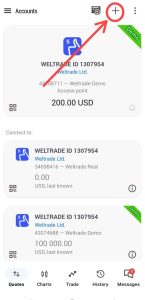
- Open the MT5 application.
- Tap the menu icon.
- Select Manage Accounts.
- Tap the + button at the top right corner to add a new account.
- Search for Weltrade.
- Select Weltrade Limited.
You’ll then be presented with a login screen.
Enter Your Weltrade MT5 Login Details
Enter the credentials that Weltrade provided when you created your synthetic indices account.
You’ll need to enter:
- Login ID
- Password
- Server
If you created a demo synthetic indices account, make sure you select the Weltrade demo as the server.
If you created a real account, select the appropriate Weltrade real as the server.
After entering your details, tap Login.
If your credentials are correct, MT5 will connect to your Weltrade synthetic indices trading account.
Here is a video that will show you how to complete the above steps.
Step 4: Find Synthetic Indices on Weltrade MT5
After successfully connecting your account, you can start looking for the available synthetic indices.
On MT5, go to the Quotes tab.
You may already see some synthetic indices displayed there. However, if the instrument you want to trade isn’t listed, you can add it manually.
To add additional instruments:
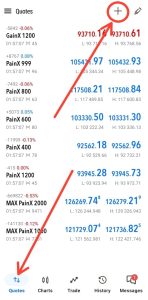
- Open the Quotes tab.
- Tap the + button.
- Select Synthetics.
- Browse through the available synthetic indices.
- Select the instrument you want to add.
For example, if you want to trade Gainx 600, locate it in the synthetic indices list and tap it to add it to your Quotes tab.
The instrument will then appear in your list of available markets.
Step 5: Open a synthetic indices chart.
Once you’ve added your preferred synthetic index, tap on the instrument.
You’ll be able to open its chart.
From the chart, you can perform your technical analysis just as you would with other instruments available on MT5.
Depending on your trading strategy, you can use the following:
- Support and resistance
- Trendlines
- Market structure
- Technical indicators
- Price action
- Other technical analysis tools
Once your analysis is complete, you can place your trade through the MT5 trading interface.
Can you trade Weltrade synthetic indices on MT5?
Yes. Weltrade provides synthetic index instruments that can be accessed through its MT5 trading account.
However, you must create the appropriate synthetic indices trading account rather than simply connecting a standard forex account.
Once the correct account has been created and connected to MT5, you can add the available synthetic indices from the Quotes section.
Demo vs Real Synthetic Indices Account on Weltrade
Weltrade allows you to create synthetic index accounts for both demo and real trading.
A demo account is useful if you’re learning how the instruments work or testing a trading strategy without risking real money.
A real account, on the other hand, involves actual funds and therefore carries the risk of financial loss.
If you’re new to synthetic indices, consider practicing on a demo account first and make sure you understand the risks involved before trading with real money.
Frequently Asked Questions
How do I trade synthetic indices on Weltrade?
First, create a Weltrade synthetic indices trading account, select MT5 as your trading platform, obtain your MT5 login credentials, and connect the account to the MT5 application. You can then add synthetic indices from the Quotes section and open their charts for trading.
Does Weltrade have synthetic indices?
Yes. Weltrade provides a range of synthetic indices instruments that can be accessed through its synthetic indices trading account.
Can I trade Weltrade synthetic indices on MT5?
Yes. You can connect your Weltrade synthetic indices trading account to MetaTrader 5 and access the available synthetic indices instruments.
Can I trade Weltrade synthetic indices on a demo account?
Yes. You can create a demo synthetic indices account and use it to practice trading on MT5 without risking real funds.
What account type do I need to trade synthetic indices on Weltrade?
You need to create the appropriate SyntX synthetic indices account when opening your Weltrade trading account.
How do I add synthetic indices to Weltrade MT5?
After connecting your Weltrade synthetic indices account to MT5, go to the Quotes tab, tap the + button, select Synthetics, and choose the synthetic index you want to add.
Conclusion
Trading synthetic indices on Weltrade MT5 involves three main stages: creating the correct synthetic indices account, connecting the account to MT5, and adding your preferred synthetic indices to the Quotes tab.
Once everything is connected, you can open the chart of your preferred instrument and perform your technical analysis directly within MT5.
If you’re new to synthetic indices, I recommend starting with a demo account so you can become familiar with the instruments and MT5 trading environment before putting real money at risk.
Watch the video tutorial above to see the entire process step by step.

Hello, I’m Alexander, the writer and founder behind Synthetic Giant.
I am a seasoned forex and synthetic indices trader with years of hands-on experience in the financial markets, including cryptocurrency, forex, and stocks. Over time, I’ve gained a strong understanding of how different markets work, and I’ve developed a passion for helping others navigate them.
In addition to trading, I have a strong background in writing and research. This combination inspired me to create Synthetic Giant — a platform dedicated to providing traders with tips, strategies, broker reviews, and step-by-step guides on synthetic indices.
My goal is simple: to help beginners and experienced traders alike gain the knowledge they need to trade synthetic indices confidently and profitably.
When I’m not trading or writing, I’m often exploring new ways to simplify financial concepts and share them with my audience in clear, practical terms.
For inquiries, feel free to reach me at admin@syntheticgiant.com
.