A demo account is useful for both beginner and experienced traders. It is a virtual trading account provided by a broker that allows traders to learn, practice, and test trading strategies without risking real money.
For a beginner who is learning how trading works for the first time, a demo account provides a safe environment to practice placing trades and become familiar with a trading platform. Instead of risking real money while learning, beginners can use virtual funds to test what they have learned and gain practical trading experience.
Experienced traders can also benefit from using a demo account. For example, when developing a new trading strategy, a trader can use a demo account to test the strategy and evaluate its performance before committing real funds. A demo account can also be useful when a trader wants to participate in the market without putting their actual capital at risk.
Just like many other financial markets, including forex and cryptocurrency, Deriv provides a demo account that traders can use to practice trading the synthetic indices available on its platform. The Deriv demo account can be used to practice synthetic indices trading on Deriv Trader and MT5.
In this guide, I will show you how to open a Deriv demo account for synthetic indices, including the steps you need to follow to get started.
Let’s jump right in.
How to sign up on Deriv
Before you can create a synthetic indices demo account on Deriv, the first thing you need to do is sign up with them. Here are steps to sign up on Deriv:
Step 1: Visit the Deriv sign up page
The first step is to visit the Deriv signup page. Follow this link, and you will be taken to the Deriv sign-up page. The sign up page look like the image shown on the picture below.
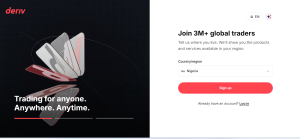
Then select your country of residence and then click on the sign-up button.
You will then be taken to a page where you have to choose the method to sign up with. You can sign up with your Google account, Facebook, Apple account, or email address. I will advise you to go for the last option by entering your email address.
Step 2: Complete the Email Verification
When you enter the email address that you want to use and sign up on Deriv and click on the next button, an email verification code will be sent to the email.
Then sign in to your email account, navigate to the inbox section, and get the verification code sent to the email address and input it into the place provided.
After completing the email verification, you will be taken to a page that looks like this:
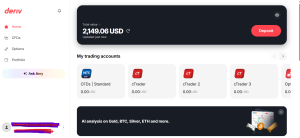
How to Create a Deriv Demo Account for Synthetic Indices
After signing up on Deriv, the next step, if you want to practice trading the synthetic indices offered by Deriv, is to create a Deriv Synthetic Indices demo account.
On Deriv, you can trade synthetic indices either as CFDs or binary options. For this demonstration, I am going to show you how to create a Deriv Synthetic Indices demo account and trade synthetic indices as CFDs on MT5.
Step 1: Create Deriv Standard CFD trading account
After signing up on Deriv, the next step is to create a synthetic indices trading account. First, navigate to the CFD page from the menu, as shown in the image below.
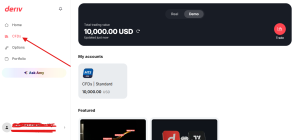
Deriv offers several different CFD account types, including the Standard CFD Account, Zero-Spread CFD Account, Swap-Free CFD Account, and Financial Account. However, if you simply want to trade synthetic indices, you need to create a Deriv Standard CFD trading account.
Look for the Deriv CFD standard account, like in the image below, and select it.
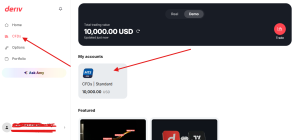
Then you will be prompted to choose a password. Endeavour to choose a password that you will remember because this is the password that you will need to connect your trading account to MT5.
Once you are able to create a Deriv CFD standard trading account, you will be brought to a page that looks like this:
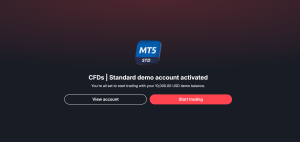
Step 2: Get your Deriv CFD standard account MT5 login details
After successfully creating a Deriv CFD standard account, you will be brought to a page that looks like this:
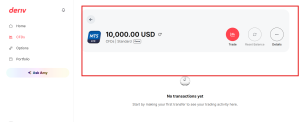
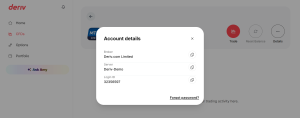
Then, the next thing is for you to get your standard account MT5 login details. To get it, just click on the Detail button as shown on the image below.
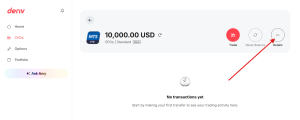
Once you click on it, the MT5 login details will pop up on a dialogue window. These MT5 login details include the server, MT5 login ID, and broker. You will need these details and the standard account password to connect your account to MT5.
Step 3: Connect the Standard trading account to MT5
With the above DMT5 login details that I showed you how to get, you will be able to connect your Deriv standard CFD account to MT5 and trade synthetic indices there.
Here is a video tutorial on how to connect your account to MT5 with the above details.
The steps to connect your Deriv account to MT5 is very simple;
- Note down the Deriv MT5 login details given to you after creating a synthetic indices trading account.
- Download the MT5 application and open it.
- From the hamburger menu, select the “plus button” at the top right corner of the page.
- Search for “Deriv” and select “Deriv” from the search result.
- Enter the login ID, broker, and login password exactly the same way they appear on your Deriv dashboard after creating the standard trading account.
- Then click on the “login” button, and you will be signed into your Deriv synthetic indices demo account automatically.
- Then you can start trading any synthetic indices instrument offered by Deriv.
Here is a video on how to trade Deriv synthetic indices on MT5;
How do I open a Deriv demo account for Synthetic Indices?
To open a Deriv demo account for Synthetic Indices, first sign up on Deriv, create a Standard CFD account, and then use the MT5 login details provided by Deriv to connect the account to MT5.
1. Which Deriv account has synthetic indices?
Deriv synthetic indices can be traded through a Standard CFD account. This is the account type used in this guide to trade synthetic indices on MT5.
2. Is a Deriv demo account free?
Yes. A Deriv demo account allows you to practice trading with virtual funds without risking your real money.
3. Can I trade Deriv Synthetic Indices on MT5?
Yes. You can connect your Deriv Standard CFD account to MT5 and use it to trade the Synthetic Indices available on Deriv.
4. How do I connect my Deriv demo account to MT5?
To connect your Deriv demo account to MT5, download the MT5 app, search for Deriv, and enter your Deriv MT5 login ID, server, and account password.
5. What Synthetic Indices can I trade on a Deriv demo account?
You can use your Deriv demo account to practice trading the Synthetic Indices available on the Deriv platform. The available instruments may vary depending on the account and platform.
6. Can I trade synthetic indices without depositing money on Deriv?
Yes. A demo account allows you to practice trading Synthetic Indices using virtual funds, so you do not need to deposit real money to practice.
7. What is the best time to trade Synthetic Indices?
Synthetic Indices are available for trading around the clock, so there is no single best time to trade. The best time depends on your trading strategy, market conditions, and personal trading schedule.

Hello, I’m Alexander, the writer and founder behind Synthetic Giant.
I am a seasoned forex and synthetic indices trader with years of hands-on experience in the financial markets, including cryptocurrency, forex, and stocks. Over time, I’ve gained a strong understanding of how different markets work, and I’ve developed a passion for helping others navigate them.
In addition to trading, I have a strong background in writing and research. This combination inspired me to create Synthetic Giant — a platform dedicated to providing traders with tips, strategies, broker reviews, and step-by-step guides on synthetic indices.
My goal is simple: to help beginners and experienced traders alike gain the knowledge they need to trade synthetic indices confidently and profitably.
When I’m not trading or writing, I’m often exploring new ways to simplify financial concepts and share them with my audience in clear, practical terms.
For inquiries, feel free to reach me at admin@syntheticgiant.com
.